


If you’ve held on to an aging Windows laptop for too long, it’s now a great time to upgrade. With all the hype around AI PCs, computer makers are rushing to release new designs featuring efficient new chips from Intel and AMD. And thanks to Microsoft’s Copilot+ initiative, which launched last year, we’re finally seeing decent notebooks powered by Qualcomm’s Snapdragon chips, which are leading to better battery life and lighter designs.
Whether you need a premium ultraportable, a powerful gaming rig or a versatile mobile workstation, our current list of the best Windows laptops highlights our favorites that have been rigorously tested by our team. You may even find a Windows laptop that suits you better than an Apple MacBook if you’re looking to make the switch. For those on a budget, check out our list of the best cheap Windows laptops to find great options that won’t break the bank.
What to look for in a Windows laptop
Performance
How much power do you actually need? That’s the main question you need to ask yourself when choosing a Windows laptop (or any computing device, to be honest). It’s easy to overspend and get far more computer than you actually need, or skimp too much and find yourself with an under-powered processor and too little memory. We’ve broken down our recommendations into a variety of product categories below, but generally you’re looking to get a laptop with at least 16GB of RAM and a modern Intel Core Ultra or AMD Ryzen processor. If you’re a gamer, you’ll also want to make sure you get a decent graphics card. (That’s all explained in our guide for best gaming notebooks.)
What are AI PCs, Copilot+ and Arm-based laptops?
Any computer that includes an NPU (neural processing unit) is an “AI PC,” since that chip can offload some tasks from the CPU and GPU. And since every chipmaker has rushed to join the AI bandwagon, most systems released today count as AI PCs. The exceptions are some higher-powered workstation and gaming laptops, which may have NPU-free chips, or extremely cheap notebooks running low-end chips.
To make it easier to find premium AI PCs, Microsoft unveiled its Copilot+ program last year. It calls for notebooks with NPUs that support at least 40 TOPS of AI processing power, 16GB of RAM and 256GB of storage. The first batch of Copilot+ systems included the new Surface Pro and Surface Laptop, as well as the revamped XPS 13.
To make things even more confusing, Copilot+ systems include PCs powered by Qualcomm’s new Snapdragon Arm-based CPUs, which can run modern Windows apps but may have trouble with older software and drivers.
Display and webcams
Regardless of whether a notebook has a touchscreen or a more traditional panel, we look for bright displays (300 nits or more) that are easy to use outdoors or in sunny rooms, with accurate colors and wide viewing angles. Screens with high refresh rates are great for competitive gamers (or anyone who wants smoother document scrolling), while those with wider color gamuts are important for content creation and video editing. And even if you don’t plan on spending a ton of time on video calls, every laptop needs a decent webcam — 1080p or higher is preferred.
Ports and connectivity
Even with advancements in cellular modems and Wi-Fi, dedicated ports for transferring data or connecting peripherals can make or break a laptop. Ideally, all but the thinnest and lightest systems come with three USB-C ports, while things like built-in SD card readers can be extremely handy when trying to import media from a camera. And if a notebook is saddled with a slow or outdated Wi-Fi modem (we’re looking for Wi-Fi 6 or later), that’s basically an immediate disqualification.
Battery life
It doesn’t matter how powerful a laptop is if it conks out when you need it the most. Typically we look for runtimes of at least ten hours on a charge, but when it comes to good battery life, longer is always better. That said, on gaming machines with thirsty graphics cards, you may have to settle for a bit less. And on bigger machines, it’s also important to consider if the system can charge via USB-C or if it needs a larger, proprietary power brick.
Best Windows laptops for 2025
Devindra Hardawar for Engadget
Screen size: 14-inch | Touchscreen: Yes | Processor: Intel Core Ultra 7 258V | Installed memory: Up to 32GB | Storage: Up to 1TB | Weight: 2.6 pounds | Battery life: 16:08
Read our full ASUS Zenbook S14 review
The Zenbook S14 shows how far ASUS has come. It’s a gorgeous premium notebook powered by Intel’s new Lunar Lake chips, giving it a healthy dose of power and battery life. In our battery testing, it lasted 16 hours and eight minutes, putting it among the best Windows PCs we’ve seen. The Zenbook S14 is also lighter than Apple’s MacBook Air, while also offering more ports (two USB-C, one USB-A, HDMI and a headphone jack). Overall, though, we were just won over by everything ASUS did right. Its Ceraluminum case feels incredibly polished, and its OLED screen also makes just about everything look great.
Pros
- Attractive modern design
- Incredible battery life
- Excellent OLED screen
- Useful port selection
- Responsive and large trackpad
Cons
- Keyboard could use more feedback
- Performance isn’t much better than Intel’s last gen
- We’re still waiting for more AI ready apps to appear
acer
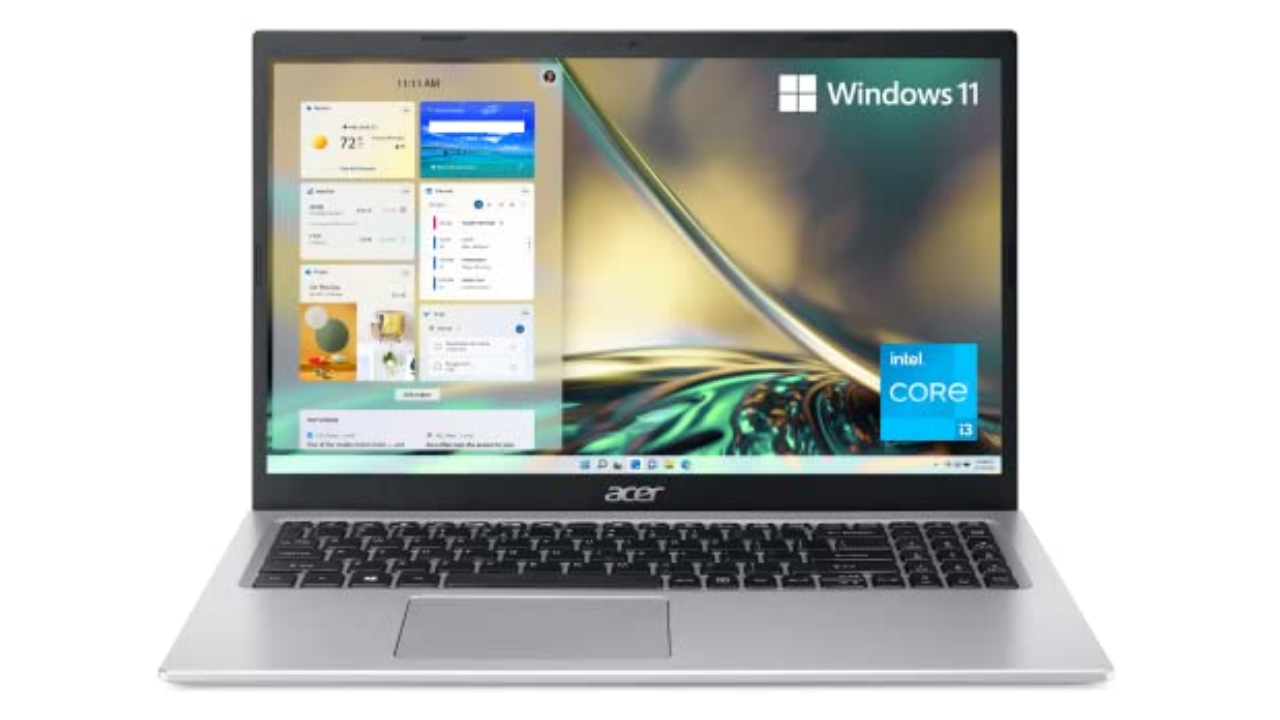
Screen size: 15-inch | Touchscreen: No | Processor: 11th-gen Intel Core i3 | Installed memory: 8GB | Storage: 128GB | Weight: 3.64 pounds | Battery life: Up to 10 hours
There’s a reason we selected the Acer Aspire 5 as our top choice in our best budget Windows laptop guide: It’s sturdy, fast enough and offers good battery life. It also comes with a Windows 11 Home (S Mode) operating system with advanced security features. We typically don’t expect much with laptops under $500, but the Aspire 5 has consistently been a solid performer. It’s an ideal laptop for students or kids, or for anyone who isn’t particularly demanding. We’re also surprised by the port selection it offers, including HDMI and Ethernet. While we normally don’t recommend laptops with just 8GB of RAM and tiny 128GB SSDs, those specs are more excusable in the Aspire 5 since it’s so darn cheap. Just think of it as a slightly more capable Chromebook, but one that can launch multiple apps and do a bit more than just web browsing.
Pros
- Includes HDMI and Ethernet ports
- Sturdy design
- Decent performance for the price
Will Lipman Photography for Engadget
Screen size: 14-inch | Touchscreen: No | Processor: AMD Ryzen 7/9 | Installed memory: Up to 16GB | Storage: Up to 1TB | Weight: 3.53 pounds | Battery life: Up to 10 hours
Read our full ASUS ROG Zephyrus G14 review
One of our favorite gaming PCs for years, the ROG Zephyrus G14 remains our choice as the best gaming laptop for most users. It weighs just 3.5 pounds, it sports AMD’s powerful new Ryzen chips and it also has the company’s fastest Radeon RX 6000-series mobile graphics. The ROG Zephyrus G14 has a sleek retro-future aesthetic, a comfortable keyboard and a smooth 144Hz, 14-inch screen. While you’d be more immersed in a 15-inch notebook, those typically cost more and are far heavier than the Zephyrus G14. If you’re looking for a balance between good performance, style and value, the G14 is an excellent option.
Pros
- Powerful performance
- Sleek design
- Great 14-inch, 144Hz screen
Cons
- A little on the heavy side
Photo by Devindra Hardawar / Engadget
Screen size: 13-inch | Touchscreen: Yes | Processor: Snapdragon X Plus/X Elite | Installed memory: Up to 32GB | Storage: Up to 1TB | Weight: 1.97 pounds | Battery life: Up to 14 hours
Read our full Microsoft Surface Pro Copilot+ review
The Surface Pro is everything we’ve wanted the Surface tablet line to be for years. It’s incredibly fast and efficient, thanks to Qualcomm’s new Snapdragon X Elite and Plus chips. Its neural processing unit (NPU) also enables potentially powerful AI features, though the current crop won’t be useful to everyone. We’re also still waiting to see Microsoft’s controversial Recall feature in action, which has been delayed to address its many security concerns.
The new OLED screen option looks wonderful: It makes colors pop off the screen and also ensures inky dark black levels. Coupled together with surprisingly powerful speakers, the Surface Pro is a solid option for watching video on the go.
When it’s paired together with the new Surface Pro Flex keyboard ($350), you can type and mouse around the Surface completely wirelessly, which opens up entirely new ways of using it. As long as there’s a small table nearby, or somewhere to prop up the tablet, you can work with just a thin and light keyboard on your lap. It’s also nice to see Microsoft pack in 16GB of RAM with the base Surface Pro model.
While we’d still like to see the company bundle in a keyboard and refine its kickstand, the Surface Pro remains one of the most innovative PCs available today.
Pros
- Snapdragon X Elite and Plus chips are wonderfully fast
- Solid battery life
- Excellent OLED screen option
- NPU allows for powerful AI features
- Flex keyboard makes it more versatile
- Solid AI features
Cons
- All keyboards sold separately
- Still hard to use in your lap
- Gets expensive quickly
Photo by Sam Rutherford / Engadget
Screen size: 14-inch | Touchscreen: Yes | Processor: 13th-gen Intel Core i7 | Installed memory: 16GB | Storage: Up to 1TB | Weight: 3.09 pounds | Battery life: Up to 14 hours
Read our full Lenovo Yoga 9i review
Adaptability is the biggest strength of a 2-in-1, with devices like the Yoga 9i capable of transforming into a number of different modes at a moment’s notice. And even though it’s got a relatively portable 14-inch OLED display, Lenovo still found room on the Yoga 9i for three USB-C ports, a fingerprint scanner and a clever rotating soundbar to ensure audio sounds good in any position. Lenovo also includes a free stylus in the box though, sadly, unlike previous models there isn’t a dedicated storage slot for it on the machine anymore. And while its general design hasn’t changed much, Lenovo has improved the Yoga 9i’s performance with updated 13th-gen Intel processors. There are also various configurations to choose from, including the choice between a Windows 11 Home or Pro operating system.
Pros
- Gorgeous OLED display
- Powerful speakers
- Strong battery life
- Four USB-C ports
- Physical webcam shutter
- Included stylus and travel sleeve
Cons
- Whiny fans
- Shallow keyboard
- No built-in stylus storage
Windows laptop FAQs
What’s the difference between a Windows laptop and a Chromebook?
The main difference between a Windows laptop and a Chromebook lies in their operating systems. Windows laptops run on Microsoft’s Windows OS, whereas Chromebooks use Google’s Chrome OS.
Aside from using different operating systems, performance is one of the major differences between a Windows laptop and a Chromebook. Windows laptops can be equipped with powerful processors and discrete graphics, making them suitable for demanding tasks like gaming or video editing. Chromebooks, on the other hand, are generally optimized for speed and simplicity, focusing on lighter tasks like word processing and web browsing.
In terms of software, Windows laptops support a range of desktop programs, whereas Chromebooks primarily use web apps or Android apps from the Google Play Store. Because of their differences, Chromebooks tend to be more affordable since they are primarily designed for basic, everyday tasks. Windows laptops can range in price from budget to premium, with the latter suitable for gaming, professionals or creatives.
What’s the difference between macOS and Windows?
When it comes to macOS and Windows, they’re basically two different worlds in the realm of computers, each with its own personality. MacOS is sleek, minimal and feels pretty intuitive, especially if you like things that just “work” out of the box. Apple designs macOS to work in tandem with its hardware, so if you have an iOS device like an iPhone or an iPad, the whole ecosystem syncs up seamlessly.
Windows is more like the jack-of-all-trades. It’s known for being super flexible and customizable. Whether you want to tweak how things look or run a wide variety of software, Windows gives you that freedom. It’s also more widely used in business settings, mainly because it’s been around longer and is compatible with tons of different programs and hardware.
Recent updates
March 2025: Updated one of our top picks and added new information about AI PCs.
September 2024: Added an FAQ section.
July 2024: We updated our top picks to include the Microsoft Surface Laptop 7th Edition.
See More
