


Back in April, I thought Framework had settled a five-year argument. The Laptop 13 Pro turned up promising a machine you own outright, with more than 20 hours of streaming battery life, a 2.8K touch screen, and a mainboard you can swap in 2030 without binning the chassis around it.
Apple’s MacBook Neo had appeared a month earlier with the opposite pitch, a $599 aluminum laptop running an iPhone chip that asks nothing of you beyond accepting the hardware exactly as it comes, with no upgrades and no tinkering.
Then 22 July arrived, Framework doubled the price of its LPCAMM2 memory overnight, and the verdict I’d already drafted in my head came apart. Nobody should feel slow for being stuck between two laptops whose gap moved days before one of them shipped. What you were weighing last month isn’t the decision in front of you today.
Quick verdict
Go with the MacBook Neo if your day revolves around a browser, a word processor, and video calls, and you want the best-built budget laptop without waiting for stock to appear.
Pick the Framework Laptop 13 Pro if you need Linux to work from day one, want to choose your own ports, and plan to keep the same chassis well past 2030.
I reached that conclusion by comparing the two laptops across six buying decisions, with new memory pricing factored into every recommendation.
What you pay in late July 2026
Framework opened the 13 Pro in April at $1,199 for the DIY Edition and $1,499 pre-built, which looked fair for a Panther Lake machine you can rebuild on a kitchen table. That arithmetic has since been redrawn. As of 22 July 2026, the 32 GB LPCAMM2 module went from $439 to $800, and the 64 GB version climbed from $849 to $1,600, while the 16 GB version holds at $239 only as long as cheaper inventory lasts.
Apple held its own line longer, though not indefinitely. The Neo arrived in March at $599 for 8 GB of memory and 256 GB of storage, with a $699 tier for the 512 GB version that adds Touch ID. Apple has since set $100 on every configuration and pointed to the same memory shortage, so the entry model costs $699 today and the larger drive costs $799.
Framework also raised system and mainboard pricing for new orders on the X7 and X9 configurations, citing increases in processor and Windows licenses, as well as memory.
CEO Nirav Patel said absorbing the supplier increase would put the company’s “ability to operate at a financial risk.” My communications background tells me that isn’t language a chief executive uses unless the situation is pressing.
If you only look at the price tag, the MacBook Neo wins with room to spare. One 32 GB Framework memory module now costs more than Apple’s entire entry-level laptop. Even so, Apple didn’t escape the same market pressure—it just passed along a much smaller increase.
The memory ceiling on each machine
The Neo caps at 8 GB and there’s no configure-to-order escape hatch. Apple’s own laptops start at 16 GB one rung up the ladder, so you’re buying half the working memory of a MacBook Air and accepting that ceiling for the life of the device. For a dozen browser tabs and a Word document, fine. Load a hundred tabs, a Slack window, and a video call, and you’ll be closing apps to keep going.
Framework goes to 64 GB of LPDDR5X at 7467 MT/s in a module you can replace, which is the whole point of LPCAMM2 and the reason I got excited in April. The catch arrived last week. Framework had enough 64 GB modules to cover pre-orders through Batch 4 of laptops and Batch 7 of mainboards, and orders beyond those batches have been reduced to a lower tier at the older price.
I wanted Framework to be the easy recommendation here, but the latest price jump makes that difficult. Paying $800 for a 64 GB upgrade feels steep, and buyers beyond Batch 4 have to settle for less memory than they expected.
Everyday speed and the software you can run
The A18 Pro inside the MacBook Neo is the same chip that powers the iPhone 16 Pro, with six CPU cores, five GPU cores, and a 16-core Neural Engine. In everyday use, I don’t think most people will notice it struggling. Browser tabs, documents, streaming, light photo edits, and even beginner coding through a package manager all feel smooth, and the fanless design means it does all of that in complete silence. The limits only show up when you ask it to handle heavier video projects or serious 3D gaming.
Framework takes a different route with three Intel Core Ultra Series 3 options and AMD Ryzen AI 300 Series mainboards. The X7 358H and X9 388H models bring 12 Xe3 GPU cores, enough to run games like Cyberpunk 2077 at playable settings. With 30 W sustained power and 60 W boost, the Laptop 13 Pro simply has more performance headroom. I also like that Framework built its first Ubuntu Certified system here, with pre-built models ready for Ubuntu and wider support for Fedora, Bazzite, NixOS, and CachyOS.

For my workflow, the Neo makes more sense because most of my time goes into research, writing articles, keeping browser tabs open, and Spotify playing in the background. Unless I pick up heavier hobbies like video editing or more demanding creative work, I don’t need the extra performance headroom.
But if your workload keeps growing, the Framework Laptop 13 Pro gives you far more room to expand. It also takes the Linux advantage outright, since Apple has never offered a true alternative for users who want that level of flexibility.
Battery life away from the charger
Framework claims over 20 hours of Netflix 4K streaming, 17 hours of active web use, and 11 hours of video calls from a large 74.45 Wh battery. I also like that Framework includes a 100 W GaN charger, which means you can get back to work faster when the battery finally runs low.
Apple, meanwhile, rates the Neo for up to 16 hours of video streaming and 11 hours of wireless web use from a much smaller 36.5 Wh battery. The trade-off is the included 20 W charger and the lack of MagSafe, which means topping it back up takes more patience.
I’ve seen too many battery claims fall apart once a laptop reaches users that I never print one without checking what owners say. From what I found, the Neo comes closer to Apple’s estimate than I expected. The most careful users report around nine to 10 hours of browsing, office work, and some YouTube, which is close to that 11-hour claim. Teachers and students mention making it through a full workday without reaching for a charger, although some owners report much shorter sessions and others are far less impressed.
The Framework side has fewer real-world reports to work with. One detailed account from a Linux distribution maintainer using an X7 358H with 16 GB of memory reported 15 to 18 hours of programming and terminal use across two workdays. However, I’d add two important caveats. The laptop was a pre-production sample provided by Framework, and the result depended on tuning through Intel’s low-power mode daemon.
On paper, the Framework Laptop 13 Pro may have the battery edge, but I find the Neo more interesting here because everyday buyers keep getting close to Apple’s numbers without tweaking settings or digging through Linux power tools.
The screen and the surfaces under your hands
Framework built a custom 13.5-inch 3:2 display with a 2880 x 1920 resolution, 700 nits of typical brightness, a 30-120Hz variable refresh rate, per-panel color calibration, a matte anti-glare polarizer, and in-cell touch support. The aspect ratio that stands out to me is 3:2. When you’re reading code, reviewing documents, or working through long articles, that extra vertical space matters more than most numbers on a spec sheet.
Framework also paid attention to the rest of the input experience. The haptic touchpad uses four piezo elements across a 123.7 mm by 76.7 mm surface, while the backlit keyboard keeps 1.5 mm of travel inside a stronger CNC input cover. I spend hours typing every day, so the deeper, more tactile feedback from the keyboard is a feature I’d appreciate during long writing sessions.
Apple’s 13-inch Liquid Retina display still impresses for the price, with a 2408 x 1506 resolution, 219 PPI, 500-nit brightness, support for a billion colors, and an anti-reflective coating. It remains one of the strongest laptop screens in its price range. The compromises are easier to spot, though. There’s no touch layer; the trackpad uses a mechanical design instead of haptics; the keyboard has no backlight; and Touch ID only appears on the $799 model.
For me, Framework takes the display and input category without much debate. The Neo’s display is still good for everyday writing and research, but the lack of a keyboard backlight is an unnecessary cut in a laptop designed for people who spend long hours using it.
What happens in year four
The Neo gives you two USB-C ports, but only one supports USB 3 speeds or external displays, and it supports a single 4K 60Hz monitor. The second port handles charging and slower accessories.
Before blaming Apple for the limited setup, I think the A18 Pro’s origins matter here. Since the chip started life inside the iPhone, it wasn’t designed around multiple high-speed laptop connections. Adding more capable ports would require hardware changes and could have pushed Apple away from using existing chip designs. For a budget laptop, keeping costs down makes sense, and the trade-off helps more people access a capable machine at a lower price.
Framework hands you four user-selectable Expansion Card slots, every one of them Thunderbolt 4, so you decide between USB-C, USB-A, HDMI, DisplayPort, Ethernet, card readers, and pocketable storage.
Longevity is where the two philosophies separate hardest. Framework’s new mainboard and display kit drop into chassis going back to the original 2021 machine, the battery comes out on three captive fasteners, and every part carries a QR code pointing at a repair guide. Apple counters with a walk-in service network, cheap accidental-damage pricing under AppleCare+, and a battery rated to 80% capacity after 1,000 cycles.
Looking four years ahead, I’d trust the Framework Laptop 13 Pro to age better. A future mainboard upgrade can give an older chassis a new life, while the Neo leaves you with the same internal hardware for the entire lifespan of the laptop.
Where the Framework Laptop 13 Pro wins
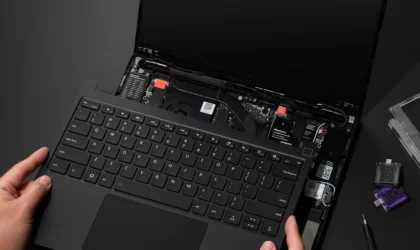
Image Credit: Framework
Framework Laptop 13 Pro DIY Edition (Intel Core Ultra Series 3)
Buy the Framework Laptop 13 Pro when Linux is part of your work. Ubuntu Certification means the fingerprint reader, firmware updates through LVFS, and power management should work from the moment you open the box instead of requiring hours of forum searches and troubleshooting.
I also see the value for anyone who’s watched a laptop become useless because of one failed component. A broken screen, worn battery, or faulty mainboard becomes a replaceable part and a short repair job instead of a reason to buy a whole new machine. I love that every part of the Framework Laptop can be replaced with the screwdriver included in the box. Swapping a battery with a simple tool, following an official repair guide, and keeping the same laptop running for years feels refreshing in a market where many machines hide repairs behind glued parts and expensive service.
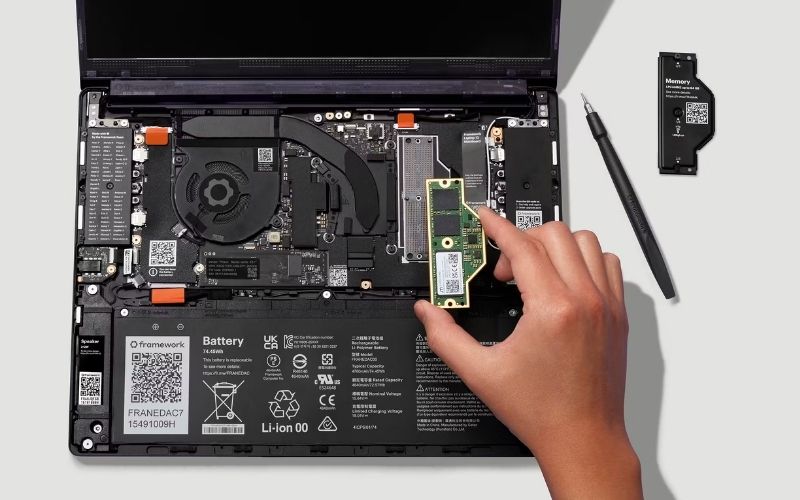
The Expansion Card system becomes more useful in everyday situations. If you often arrive at client sites and need Ethernet in one meeting and HDMI in another, you can carry the ports you need without filling your bag with adapters.
Existing Framework Laptop 13 owners get an even bigger benefit, since the new chassis, battery, and haptic input cover work with older mainboards. Upgrading becomes a targeted refresh rather than starting from scratch.
Where the MacBook Neo wins

Image Credit: Apple
Go with the Neo when your budget matters most and your workload stays simple. If you’re a student, a first-time laptop buyer, or someone who spends most of the day in Chrome and Google Docs, you get an aluminium machine with a bright, high-resolution display for $699.
Education pricing lowers the cost even further, and I don’t think many Windows laptops at the same price can match the Neo’s build quality.
The Neo also makes the most sense if your household already uses Apple devices. Messages, FaceTime, iPhone Mirroring, and password handoff work together without much setup, which removes a lot of small annoyances from daily use. AppleCare+ also keeps repairs manageable, with a broken screen costing $50 at a service counter you can walk into.
Related: MacBook Neo vs. M5 MacBook Air—Here’s what changes when Apple uses a phone chip
I also appreciate the fanless design more than I expected. A silent laptop matters when you’re recording lectures, working late in a shared room, or simply want fewer distractions. Add reliable stock and predictable pricing, and the Neo becomes an easy recommendation in a market where both have become harder to guarantee.
My final verdict
Anyone weighing Framework against Apple today wants two guarantees: Linux works, and the laptop stays theirs. The Framework Laptop 13 Pro delivers both, so it gets my recommendation, with one caveat.
Choose the Framework Laptop 13 Pro‘s 16 GB module while it costs $239 and upgrade later. LPCAMM2 prices will come down again, and spending $1,600 on 64 GB today funds someone else’s shortage.
The MacBook Neo makes more sense when price matters most and your work stays in a browser, and at $699 it’s hard to argue against. What nobody should do is stretch to a maxed-out Framework configuration for headroom they will never touch, least of all in the week when the price of it doubled.

