


Here’s the hard truth nobody tells you when you’re deep in a rabbit hole of spec sheets at midnight. Your camera is probably the least important piece of your streaming setup. Audio quality will make or break whether someone stays in your channel. Lighting determines whether a $50 webcam looks like a $300 one. And consistency (showing up on a schedule) matters more than any piece of gear you’ll ever buy. That said, you do need something pointed at your face, and some options are smarter buys than others.
What beginner Twitch streamers needs
Before dropping money, ask yourself three honest questions.
Where will your face appear on screen? If you’re a gaming streamer, your facecam is a small box in the corner—maybe 491×276 pixels in practice. By the time that feed reaches a viewer’s browser at non-fullscreen size, you’re talking maybe 300×170 pixels. At that scale, 4K is marketing fluff. A solid 1080p image with good lighting will be indistinguishable from a $400 4K webcam in that tiny corner box.
Do you have lighting sorted? This is non-negotiable. A C920 with a decent key light will beat a premium camera in a dark room. You don’t need a photography studio—a ring light bounced off a white wall, or even a bright desk lamp angled correctly, can transform your image. Budget for lighting before you budget for a better camera.
Are you actually going to stick with this? The streaming space is oversaturated right now. There are millions of active streamers and the viewer pool hasn’t grown proportionally. Starting with mid-tier gear is smart risk management—if you’re still at it in six months and loving it, then upgrade. Experienced streamers often say they wish they’d spent less on cameras early and more on audio or just on playing consistently.
Top picks
Best budget pick: Elgato Facecam Neo
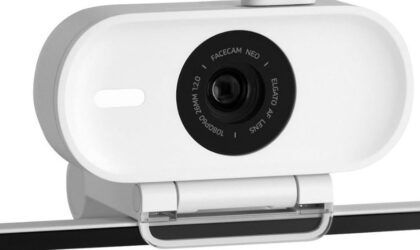
When Elgato cut the Facecam Neo‘s price from $100 to $59.99, it became a no-brainer. I tell friends: if you’re not sure how long you’ll stream, buy this one. You get 1080p at 60fps, reliable autofocus, and a physical privacy shutter—that last feature sounds small until you use it every stream instead of searching for tape to cover the lens.
What sets the Neo apart from the budget webcam pile is the software. Elgato Camera Hub gives you real control over ISO, shutter speed, and white balance—and here’s the part I love—it stores your settings on the camera itself. Reinstall Windows, switch PCs, bring it to a friend’s setup: your settings stay with you. I didn’t expect that level of thought at this price.
If your desk faces a window and you fight that blown-out backlit look, the HDR mode fixes it. Fair warning though—it locks you to 30fps, so understand that trade-off before you enable it. For most gaming streams, I’d leave it off unless backlight becomes a problem.
The things that may bug you: The USB-C cable is hardwired and short, so on a desktop tower you’ll likely need a cheap extension. The autofocus can hunt at times if you move around. So I recommend locking it to fixed focus in Camera Hub. It takes 30 seconds and solves the issue for good.
Best for: First-time streamers, anyone on a tight budget, and anyone who just wants something that works without a setup headache.
Best midrange pick: Elgato Facecam MK.2
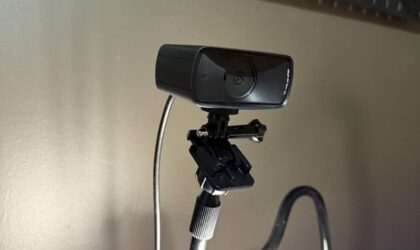
If you’ve been streaming for a few months, you’re having fun, and you want a meaningful step up, the Facecam MK.2 is where to go. The image has a warmer, more cinematic quality than the Neo, and the fixed-focus lens delivers razor sharpness at a set distance—great if you don’t move around much. Settings save to the camera, the software stays out of your way, and it integrates cleanly with OBS and Streamlabs.
No built-in mic here either, which by now you should be treating as a feature rather than an omission. Just make sure you’re on a USB 3.0 port because there are occasional reports of power delivery quirks on older USB setups.
Best for: Streamers a few months in who want a polished image and cleaner software control.
Best upgrade pick: Insta360 Link 2C
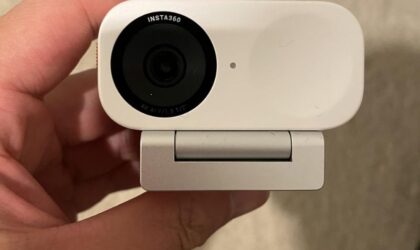
For streamers who shift around on camera, mix gaming with variety content, or deal with uneven room lighting, the Insta360 Link 2C stands out as one of the strongest picks right now. It records in 4K at 30fps with a 1/2-inch sensor and F1.8 aperture, which helps the image stay cleaner and brighter once the room lights drop. The autofocus locks on fast and stays reliable whether you lean close to the camera or sit farther back, while HDR keeps exposure balanced during long streams as daylight fades and lamps take over.
Audio handling also feels more practical than most webcams in this range. You can prioritize voice clarity, cut down keyboard and mouse noise, or keep music and background sound from overpowering your mic. The auto-framing feature keeps you centered in the shot without needing the larger motorized gimbal from the higher-end model. Its compact size helps on crowded desks, and the built-in privacy shutter makes it easy to cover the lens once the stream ends.
The Insta360 Link 2 Pro deserves a look if you create IRL-style content, tutorials, or streams where you move around often. The gimbal tracking and gesture controls work well for hands-free setups. For most gaming-focused streamers, though, the 2C offers the better balance of features, size, and price.
Best for: Streamers serious about image quality, bad lighting situations, or anyone doing variety/creative content who wants flexibility.
Wildcard: Your phone
It sounds like a workaround, but phone cameras—especially anything from the last three or four years—outperform most webcams at the same price point. Apps like DroidCam OBS or Camo let you use your phone as a webcam with low latency, either over USB (essentially zero delay) or Wi-Fi. Quality is excellent.
The downsides are real though. Your phone will get hot during long streams, and running it plugged in for hours is hard on the battery over time. If you’re using your current daily driver, this is a real concern. An older phone you no longer need is ideal—it’s essentially a free high-quality webcam.
What to skip
Skip the Logitech BRIO for streaming purposes, at least at this stage. It’s not a bad camera, but community consensus is that it consistently underperforms relative to its price—auto exposure issues, settings resetting in OBS, and a finicky personality that requires coaxing to look good.
The image is decent in ideal lighting but so is the C920 at a fraction of the cost. Several people who’ve owned both report the BRIO’S incremental quality gains don’t justify the premium for a facecam that lives in a corner of your stream.
Also skip anything branded as “4K streaming” from no-name manufacturers on Amazon for under $40. The sensors are small, the optics are poor, and the drivers are often unstable. You’re better off with a reliable 1080p camera from a known brand.
Quick-start advice
Buy the Elgato Facecam Neo. Take the $40 you just saved over a more expensive camera and put it toward a basic key light—a ring light or a $20 LED panel both work. Spend your first 30 streams figuring out what kind of streamer you want to be, not optimizing your setup. Get a cheap dynamic USB mic, because bad audio kills channels faster than anything else. When you hit stream 40 and you’re still having fun, you’ll know exactly what to upgrade and why—and it probably won’t be the camera.

