


There was a time when you could still find a solid gaming laptop under $1,000. That era feels distant now. So when my head of content asked me to put together a buyer’s guide for the best gaming laptop under $500 for Fortnite, Valorant, and Roblox, I felt that familiar drop in my stomach.
Maybe you’re a student, maybe you just don’t want to drop a grand on a machine that’s mostly going to sit on a desk, or maybe the budget is just what it is. Whatever the reason—I’ve been there, I’ve done the research, and I have thoughts.
The truth is simple. Gaming laptops under $500 are almost gone in 2025–2026. Dedicated GPUs start to make sense closer to the $700–$800 range. But that’s not the end of the story.
Fortnite, Valorant, and Roblox don’t behave like modern AAA titles. They’re competitive, optimized games designed to run on modest hardware. So I’ll walk you through what matters, what works, and what I’d steer clear of.
What you actually need for Fortnite, Valorant, and Roblox

Let me translate the spec sheet nonsense into plain English for your specific use case:
- A modern processor (the most important thing). Fortnite and Valorant are surprisingly CPU-heavy compared to GPU-heavy AAA games. A decent 12th-gen Intel Core i5 or AMD Ryzen 5 7000-series chip will carry you far. Avoid anything labeled Intel Celeron, Pentium, or older AMD A-series chips — those will bottleneck you hard even in Roblox.
- At least 16 GB of RAM. 8 GB technically works for Roblox, but the moment you’re running Discord, a browser, and the game together—which you will—it gets choppy. 16 GB is the sweet spot and worth hunting for.
- Fast SSD storage. This doesn’t affect frame rates, but it makes your whole experience smoother. Boot times, game load times, everything. Avoid any laptop that still ships with a spinning hard drive in 2026.
- A 1080p IPS display. Valorant especially benefits from a faster refresh rate—120 Hz or 144 Hz if you can find it. At minimum, IPS over TN; the colors and viewing angles are night and day.
My top picks
Best overall: Acer Aspire Go 15 (AG15-32P-30YE)
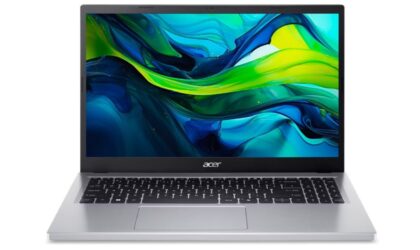
Acer Aspire Go 15 (AG15-32P-30YE)
Acer’s Aspire Go 15 (AG15-32P-30YE) is the one I’d recommend to you without hesitation. It packs an Intel Core 3 N355 processor with 16 GB of RAM—double what most cheap Windows laptops bother with—and a 512 GB SSD. The 15.6-inch 1080p display is decent for the price, free of the ugly color tints that plague laptops in this range, and the battery holds up around 9 hours.
Why it works for your games: Fortnite, Valorant, and Roblox are all built to scale down gracefully. At medium-to-low settings, you’ll hit playable 60+ FPS consistently. Valorant in particular runs beautifully on modest hardware—that’s by design, since Riot built it to be accessible.
The downsides: It’s not a thin-and-light. At 3.74 pounds, it’s better used at a desk than carted around campus all day. The build quality is plasticky—the lid flexes a bit. It also ships with a mountain of bloatware you’ll want to uninstall. But for gaming at home? The Aspire Go 15 (AG15-32P-30YE) delivers.
Runner-up: Acer Aspire Go 15 (AG15-21P-R0RR)
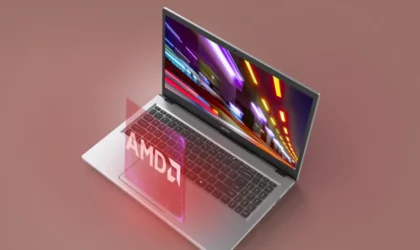
Acer Aspire Go 15 (AG15-21P-R0RR)
Could be out of stock depending on your region.
If the top pick is out of stock or you want to save a bit, the Acer Aspire Go 15 (AG15-21P-R0RR) variant gets the job done. It drops to 8 GB of RAM and 256 GB of storage, which are downgrades—but it still runs a Ryzen 3 7320U processor, gets 9.5 hours of battery life, and charges via USB-C. The display is actually slightly warmer and more accurate than the pricier version.
Why it still works: For Roblox and Valorant specifically, 8 GB and a Ryzen 3 is enough.
The downsides: It’ll show its age faster than the 16 GB model. Multitasking with Discord, Chrome, and the game open simultaneously will start to feel sluggish within a year or two.
Best laptop alternative: Apple iPad (11-inch) with A16 chip for Roblox and Fortnite

Apple iPad (11-inch) with A16 chip
An Apple iPad (11th generation) with a Bluetooth keyboard or keyboard case is the wildcard pick. Before the PC gaming crowd starts typing angry comments, let me explain why it deserves a spot here.
Roblox runs exceptionally well on iPadOS, Fortnite has returned to iPhone and iPad worldwide, and touch controls work well for casual sessions. Pair the tablet with a controller, and you’ve got a setup that feels more console than laptop.
Why it works: The A16 chip is fast for mobile gaming. Roblox flies, battery life lasts a full school day, and the 11-inch display looks far better than the washed-out panels you’ll find on most sub-$500 Windows laptops. It’s also silent, instant-on, and weighs barely over a pound.
The downsides: If Valorant is your main game, cross the iPad off your list right now—there’s no native version available. You also lose the flexibility of Windows for schoolwork, mods, and general PC gaming. Once you add a decent keyboard case, the total cost starts creeping toward budget gaming laptop territory.
If you can stretch to ~$700: Lenovo LOQ 15 (NVIDIA GeForce 2050 model)
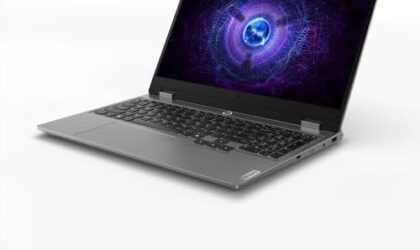
Lenovo LOQ 15 (NVIDIA GeForce 2050 model)
Okay, I know this bends the $500 rule, but the extra money gets you a massive jump in gaming performance. If there’s any flexibility in the budget at all—birthday money, waiting for a sale, whatever—the Lenovo LOQ 15 with an NVIDIA GeForce 2050 is a different league. The display is great, the keyboard feels satisfying to type on, and you get actual dedicated graphics that will handle Fortnite on high settings at 144 Hz without breaking a sweat.
Why it’s worth considering: The jump from integrated graphics to a dedicated GPU is enormous for Fortnite especially. If you ever want to try other games down the road—anything from Minecraft with shaders to GTA V—this handles it all comfortably.
The downsides: It’s $699.99, not $500. And it gets loud under load. But for pure gaming value? Nothing in its weight class touches it.
What to skip
Budget gaming laptops come with plenty of compromises, but some are deal-breakers:
- Don’t overpay for RGB lighting. I don’t care how cool the keyboard looks when you’re shopping at 2 am. RGB LEDs do nothing for your frame rates in Fortnite. Budget laptops with flashy RGB usually cut corners on display quality or RAM to keep costs down. It’s a trap.
- Skip anything with an Intel Celeron or Pentium processor. These chips are so slow they’ll struggle to run more than two apps at once. Fortnite will stutter. Valorant will lag. Roblox will crash.
- Avoid hard drive (HDD) laptops. Some laptops in this price range still ship with spinning hard drives to save money. Your games will take 3 minutes to load and your OS will be painfully slow. SSD only, period.
- Don’t be fooled by gaming branding on weak hardware. Some laptops slap the word gaming on the box with a dark chassis and call it a day. Check the actual processor and RAM specs before you buy, not just the marketing language.
Quick-start advice
Before you order, hear me out. Search for the specific laptop model + “Fortnite” or “Valorant” on YouTube. You’ll find real footage of the exact machine running the exact game at actual settings—way more useful than any spec sheet. And the moment your laptop arrives, spend 20 minutes uninstalling the bloatware that comes preloaded on Windows budget machines. It makes a noticeable difference in how snappy everything feels.
Happy gaming. You don’t need to spend $1,500 to have fun.
Related: Lauren’s hunt for the best gaming laptops under $500 for students (and what she found)
Grigor Baklajyan is a copywriter covering technology at Gadget Flow. His contributions include product reviews, buying guides, how-to articles, and more.

